How to Use ChatGPT (GPT-5) with QuickBooks Online: A Step-by-Step Guide for Small Business Owners
🤖 AI Is Changing How We Manage Small-Business Finances
Let’s be real — bookkeeping can feel like a never-ending checklist. Reconciling accounts, tracking receipts, explaining reports… none of it’s what you started your business for.
That’s why smart business owners across Santa Barbara County and beyond are embracing ChatGPT (GPT-5) to work with QuickBooks Online (QBO), not against it.
When used correctly, ChatGPT becomes your virtual financial assistant — helping you:
✅ Make sense of your numbers faster
✅ Automate routine communication
✅ Spot red flags before they turn into emergencies
Here’s how to use it the right way (and safely).
🧭 Step 1: Understand What ChatGPT Can — and Can’t — Do
Before you plug AI into your books, you need to know its boundaries.
| AI Can Do This | But It Can’t Replace This |
|---|---|
| Summarize QuickBooks reports in plain English | Your judgment and strategy |
| Draft emails to clients or accountants | Personal tone and discretion |
| Suggest patterns or spending insights | True financial analysis |
| Automate recurring task lists | Oversight and compliance review |
💡 Think of ChatGPT as your financial assistant, not your financial advisor.
⚙️ Step 2: Connect ChatGPT with QuickBooks the Smart Way
There isn’t a direct “ChatGPT + QuickBooks” integration yet (as of November 2025), but you can safely connect the two using Zapier, Make, or Microsoft Copilot.
| Integration Tool | What It Does | Example Use |
|---|---|---|
| Zapier AI Flows | Automates actions between apps | Send a Slack alert when new transactions post in QuickBooks |
| Microsoft Copilot for Excel/Outlook | Summarizes data and emails | Drafts monthly summaries of income & expenses |
| QuickBooks Online’s AI Assistant | AI built directly into QBO | Suggests categories and forecasts cash flow |
| Custom GPT (via OpenAI) | Tailored to your business | Trained to summarize reports or draft insights |
🔒 Pro Tip: Never share raw QuickBooks data with public ChatGPT. Use summaries, redacted exports, or custom GPTs to protect financial privacy.
🧾 Step 3: Use These ChatGPT (GPT-5) Prompts Inside Your Workflow
Below are practical prompts that work today with QBO exports, CSVs, or summaries:
| Purpose | Prompt Example | Result |
|---|---|---|
| Monthly summary | “Summarize this QuickBooks P&L report and highlight any major shifts vs last month.” | A one-paragraph CEO-ready summary |
| Cash flow insight | “Based on this report, what expenses seem unusually high or inconsistent?” | Pinpoints problem areas instantly |
| Client communication | “Write a short email to my accountant summarizing these key points.” | Saves you 10–15 minutes per message |
| Budget planning | “Use this year-to-date data to forecast next quarter’s budget and suggest savings.” | Realistic planning insights |
🧠 These prompts turn QuickBooks data into usable business intelligence.
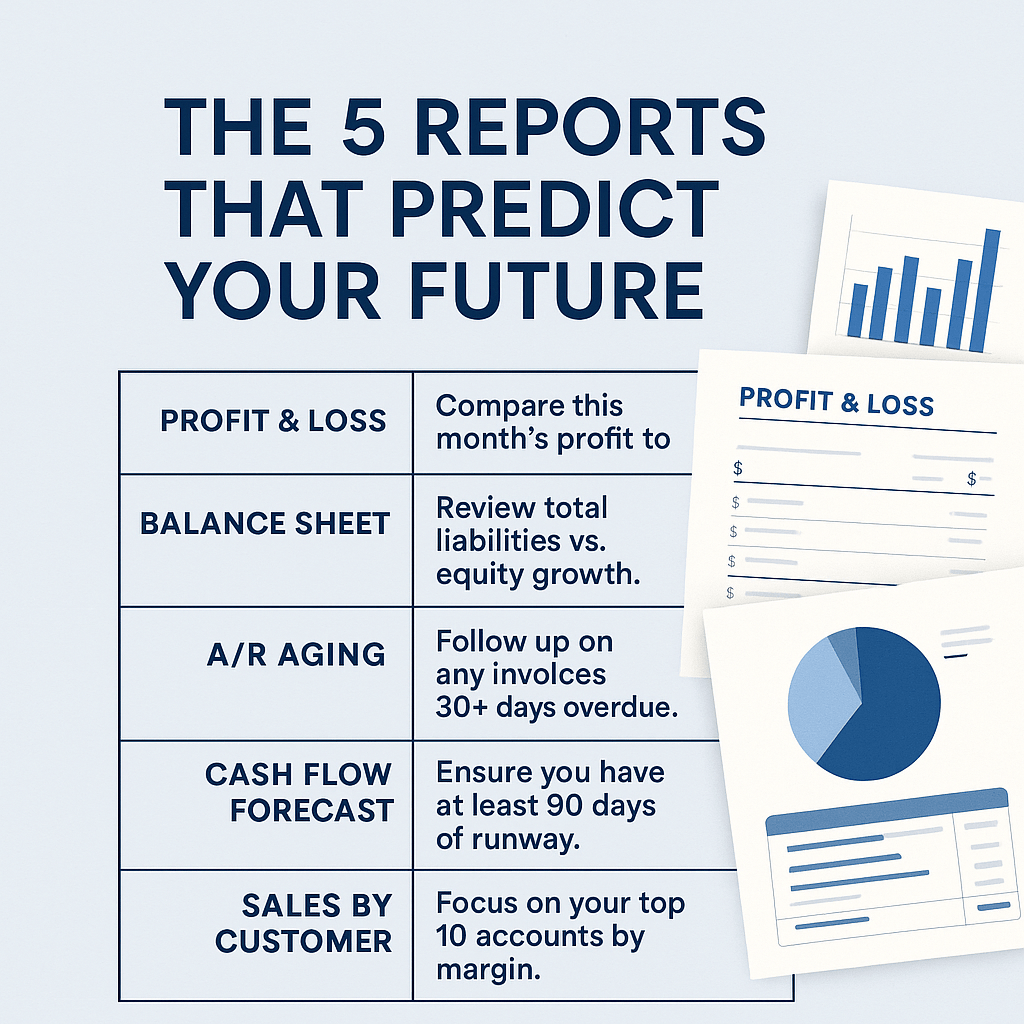
📊 Step 4: Combine ChatGPT with QuickBooks Reports
You can use ChatGPT to explain and interpret QuickBooks reports without ever exporting sensitive files.
For example:
Copy the “Total Income” and “Total Expenses” sections.
Paste into ChatGPT with:
“Here’s my P&L summary for October. What are three insights or trends I should watch next month?”
You’ll get instant, actionable takeaways — in language anyone can understand.
🧮 Step 5: Automate Routine Bookkeeping Tasks (Safely)
Here’s where AI shines: creating reminders, checklists, and summaries.
| Task | Automation Option | Pro Tip |
|---|---|---|
| Weekly review checklist | ChatGPT + Zapier | “List everything I should check in QuickBooks every Friday.” |
| Recurring payment alert | QuickBooks + Gmail trigger | Flag when recurring bills increase unexpectedly |
| Report summaries | Custom GPT or Copilot | Generate plain-language summaries for team updates |
| Expense review | QuickBooks AI Assistant | Review all “Uncategorized” transactions weekly |
⚠️ Always double-check AI outputs — even small automation errors can snowball fast.
🧩 Step 6: Build Your Own “Bookkeeping GPT”
One of GPT-5’s most powerful features is the ability to create Custom GPTs — private, secure assistants that follow your exact workflow.
Imagine your own “Bookkeeping GPT” that:
Knows your preferred QuickBooks categories
Writes summaries the way you do
Generates client update emails
Flags anomalies or duplicate expenses
And it never calls in sick.
🧩 Pro Tip: Train it with templates, not data. Upload sanitized examples — like an empty P&L or email draft — so your GPT learns the pattern, not the numbers.
📍 Why This Matters for Santa Barbara Businesses
Small businesses in Santa Barbara, Goleta, and along the Central Coast are known for creativity — not data entry.
Using AI tools like ChatGPT with QuickBooks lets you:
Spend less time in spreadsheets
Get faster insights for local growth decisions
Stay ahead of competitors who still do everything manually
But remember — AI is a tool. It amplifies what’s already there.
If your books are messy, AI just automates the mess.
That’s why clean, consistent bookkeeping comes first.
💬 Final Thoughts: Smarter, Not Riskier
ChatGPT and QuickBooks together can save you hours every month, but only if your financial foundation is solid.
At Synergy Bookkeeping, we help business owners get that foundation right — so when you plug in AI, it works for you, not against you.
📞 Ready to make your books smarter — and your life easier?
Schedule a free consultation today and let’s get your bookkeeping AI-ready.